How to Spot Trade on BiFu: App and Web Steps
BiFu Editorial · 2026-07-10 · 3 min read
Table of contents
Looking to start spot trading on BiFu? This comprehensive English guide walks you through everything you need to know about BiFu Spot Trading on both the mobile App and PC web version.
Spot trading lets you buy and sell real cryptocurrencies (like BTC, ETH, SOL) at current market prices with immediate settlement — perfect for beginners and long-term holders.
What Is Spot Trading on BiFu?
Spot trading (Spot) means buying or selling digital assets instantly at the current market price.
You receive the actual cryptocurrency immediately after the trade.
No leverage involved — lower risk compared to futures.
Ideal for holding assets long-term or quick buys/sells.
BiFu offers competitive 0.1% maker/taker fees on spot trades, deep liquidity, and seamless integration with other markets like Forex and RWA.
Step-by-Step: How to Do Spot Trading on BiFu App
Login to BiFu App – Open the app and log into your account (register first if needed via email).
Go to Trade Section – Tap the “Trade” or “Markets” tab at the bottom navigation.
Select Spot Market – Switch to Spot mode and search for your trading pair (e.g., BTC/USDT, ETH/USDT).
Analyze the Chart – View real-time candlestick charts, order book, and recent trades.
Place Your Order:
Choose Market Order for instant execution at current price.
Or Limit Order to set your desired buy/sell price.
Enter the amount or value you want to trade.
Review fees and total.
Click Buy (green) or Sell (red) to confirm.
Check Orders – View active orders, filled trades, and holdings in the order history section.
How to Spot Trade on BiFu PC Web Version
Visit https://bifu.co/ in your browser and log in.
Navigate to the Spot trading section (usually under Crypto or Markets).
Search and select your trading pair (e.g., BTC/USDT).
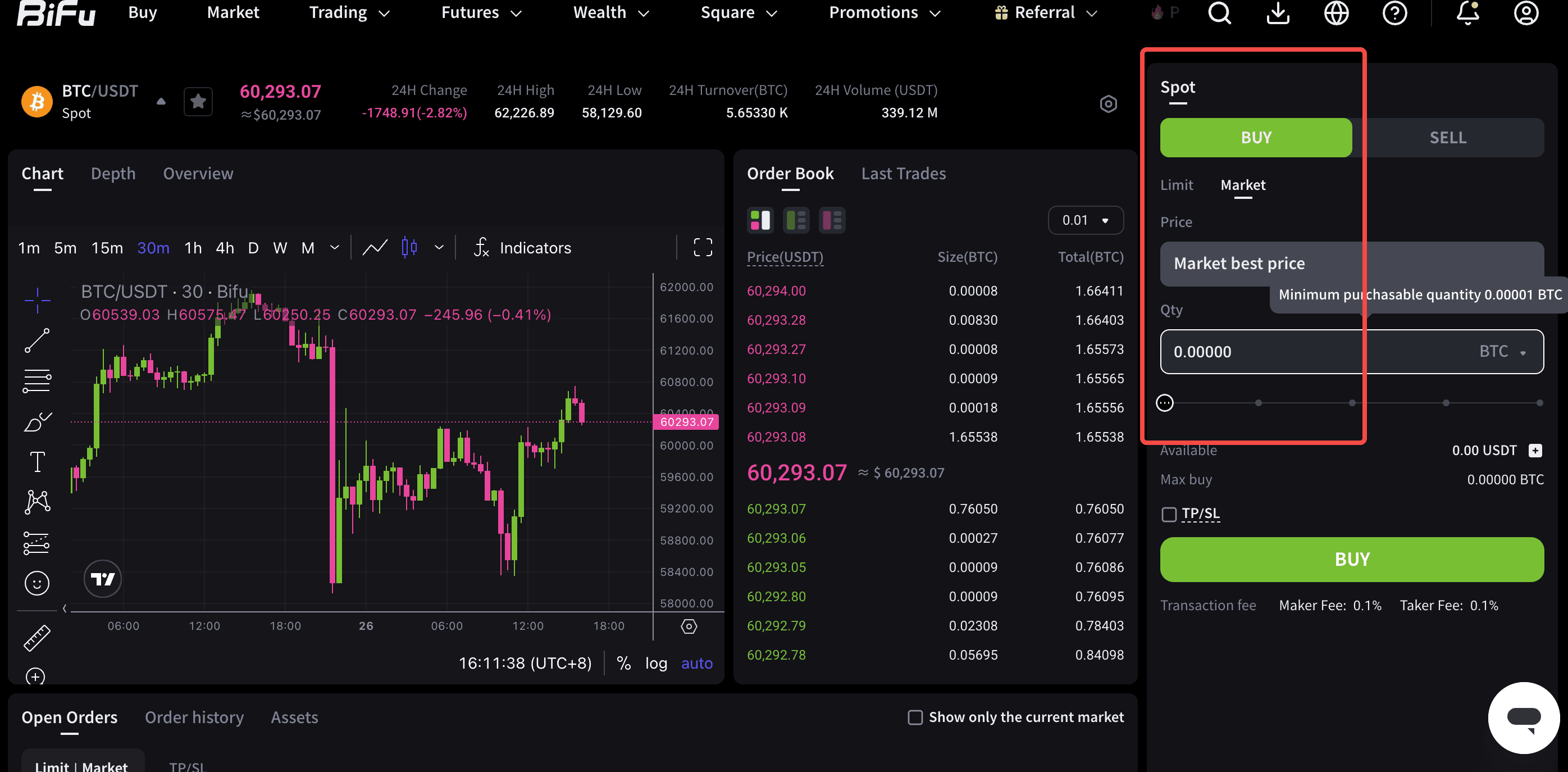
Use the advanced charting tools on the left for technical analysis.
In the order panel (typically on the right), select order type, enter amount/price, and submit.
Monitor positions and history in real-time.
PC Advantages: Larger screen for multi-chart viewing, better for detailed analysis, and easier copy-paste of addresses.
Essential Tips for Successful BiFu Spot Trading
Deposit Funds First: Go to Assets → Deposit (supports USDT and other cryptos). Transfer to your Spot account if needed.
Risk Management: Use stop-loss and take-profit orders. Diversify your portfolio.
Fees: Spot trading fees are 0.1% maker/taker — competitive for the industry.
KYC Recommendation: Not mandatory for basic trading, but completing it increases withdrawal limits.
Mobile + Web Sync: Trade on App while analyzing on PC — accounts are fully synchronized.
Common Questions About BiFu Spot Trading
How do I deposit for spot trading? Deposit crypto to your account and ensure funds are in the Spot wallet.
Supported Pairs? Major pairs like BTC/USDT, ETH/USDT, and many altcoins.
Order Not Filling? Market orders execute instantly; limit orders depend on price reaching your target.
Withdrawal? After trading, transfer assets back to your funding wallet and withdraw to external wallets (processed within 24 hours for crypto).
Is it safe? BiFu is regulated in multiple jurisdictions. Always use official links and enable security features.
Pro Tip: Start with small amounts to get familiar with the interface. BiFu also offers copy trading and other tools to complement your spot strategy.
Download the BiFu app
Looking to start spot trading on BiFu? This comprehensive English guide walks you through everything you need to know about BiFu Spot Trading on both the mobile App and PC web version.
Disclaimer
Looking to start spot trading on BiFu? This comprehensive English guide walks you through everything you need to know about BiFu Spot Trading on both the mobile App and PC web version.
Related articles
How to Trade FLOW USDT Futures : Complete Guide 2026
Flow is a Layer‑1 blockchain for consumer apps, NFTs, and gaming. Trading FLOW USDT perpetual futures on Bifu gives you leverage up to 200x, competitive fees (0.04%/0.08%), and 24/7 liquidity.
2026-08-23 · 1 min read
Bifu Deposit Methods: A Complete Guide to Cryptocurrency Deposits
Bifu offers fast, secure crypto & fiat deposits for multi-asset trading. Supports USDT, BTC, ETH, etc. via TRC20/ERC20/BEP20, plus P2P & bank transfers. Low fees, real-time processing, 2FA, cold-hot wallet security. Step-by-step guide, safety tips, FAQs included. Ideal for global traders.
2026-08-17 · 1 min read


Trading
Risk Warning
Trading foreign exchange, contracts for difference, over-the-counter derivatives, margin products, and other leveraged financial instruments involves a high level of risk and may not be suitable for all clients. These products can result in losses that may exceed your initial deposit, depending on the product terms, account settings, and applicable legal protections. You should not trade unless you fully understand the nature of the products, the risks involved, and the extent of your exposure. When trading derivative products, you do not own or have any rights to the underlying asset.
The information provided on this website is general in nature and does not take into account your investment objectives, financial situation, trading experience, or particular needs. Nothing on this website should be construed as personal financial advice, investment advice, an offer, invitation, solicitation, recommendation, or inducement to buy, sell, subscribe for, or dispose of any financial product or service.
All market commentary, educational materials, research content, platform information, and other materials published on this website are provided for general information and reference purposes only. Past performance, historical data, examples, forecasts, or simulated results are not reliable indicators of future performance.
Access to Bifu Markets’ products and services is not available in all jurisdictions. We do not open accounts for residents of certain countries and jurisdictions, including but not limited to the United States, Australia, Canada, and the Democratic People's Republic of Korea.
By accessing this website, you confirm that you are doing so on your own initiative and that you are responsible for ensuring that your use of this website and any services provided by Bifu Markets complies with the laws and regulations applicable to you in your jurisdiction.
Bifu is operated by Bifu Markets (Pty) Ltd.
Registered address: Norwich Place West, 2nd Floor, Cnr 5th and Norwich, Sandown, Sandton, Gauteng, South Africa.